
Vendor power
A stall loses power mid-setup. The vendor needs staff, not another group chat.
OAO · Operational Administration Overview
OAO, Operational Administration Overview, is the live operations layer for events.
It connects organisers, staff, security and vendors while the day is happening. Each person sees what is relevant to their role. The organiser sees the full picture.
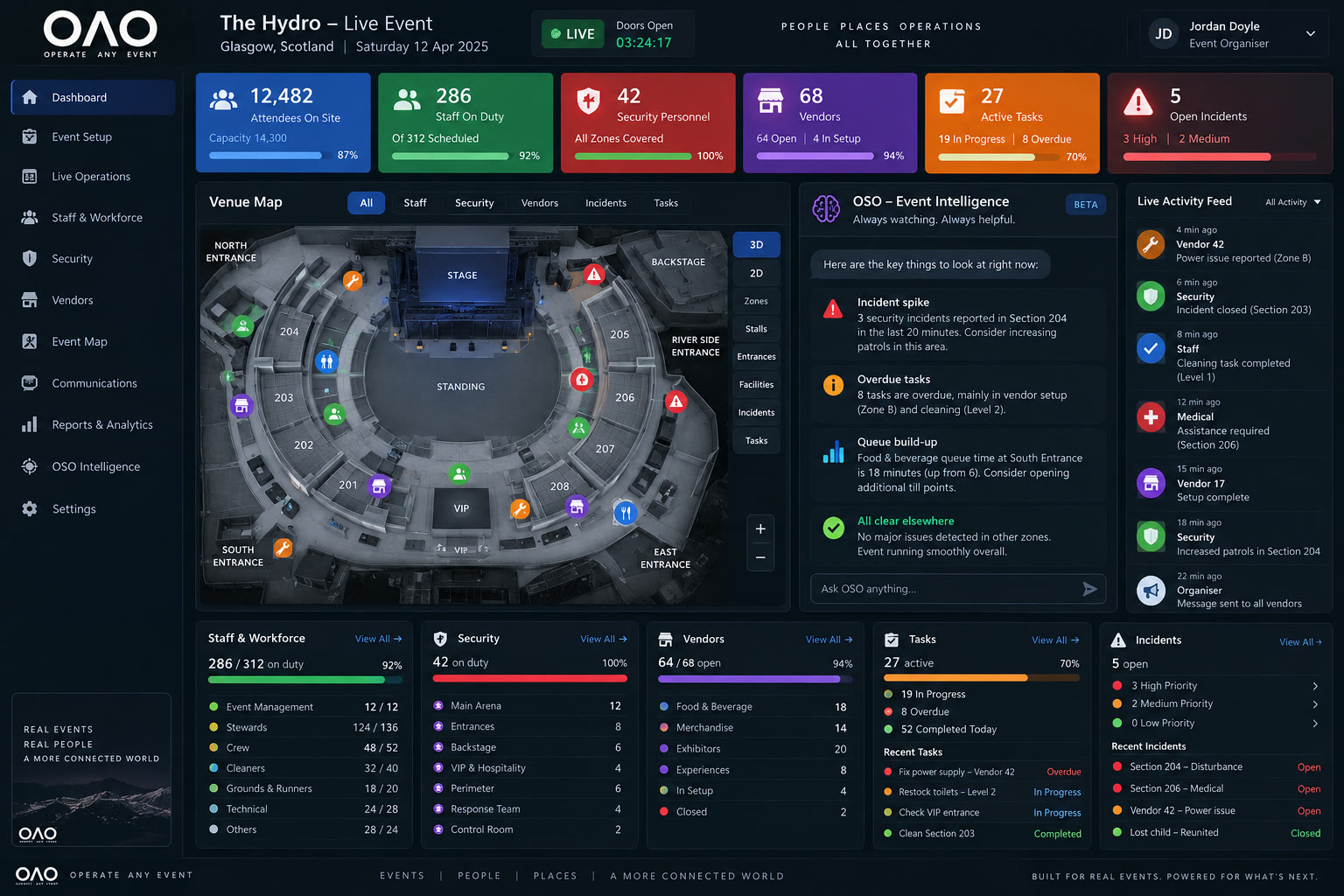
What OAO does
Every user gets a role-based workspace through Passport, while the organiser sees the whole event.
Behind the curtain
A stall loses power mid-setup. The vendor needs staff, not another group chat.
A steward has not arrived. The roster still says they are on the door.
An incident is logged at an entrance. It needs an owner, a place, and a record.
A setup job slips. Nobody can see it unless they already know to look.
A floor is short. You only notice when the queue appears.
A guest is sent to the wrong door. Staff on the ground cannot see the same instruction.
Those problems usually live in different places. OAO pulls them into one operational picture.
Organiser command centre
Presence, role, team and zone — not a static roster from last week.
Open tasks, incidents, overdue jobs and help requests in one place.
A live map and zone picture, not a separate floorplan on someone’s phone.
Every item has a team or a person. The organiser can see the gap if it does not.
Examples from a simulated event day — not live figures.
Incident
Security incident logged at the north entrance
Example from a simulated event day — assigned to the door team.
Vendor
Power issue reported at a stall
Example from a simulated event day — floor staff can see the job.
Staff
Steward still not checked in
Example from a simulated event day — the zone stays short until someone covers.
Task
Setup task overdue in Zone 2
Example from a simulated event day — visible to the organiser and the assigned team.
Everyone gets the right view
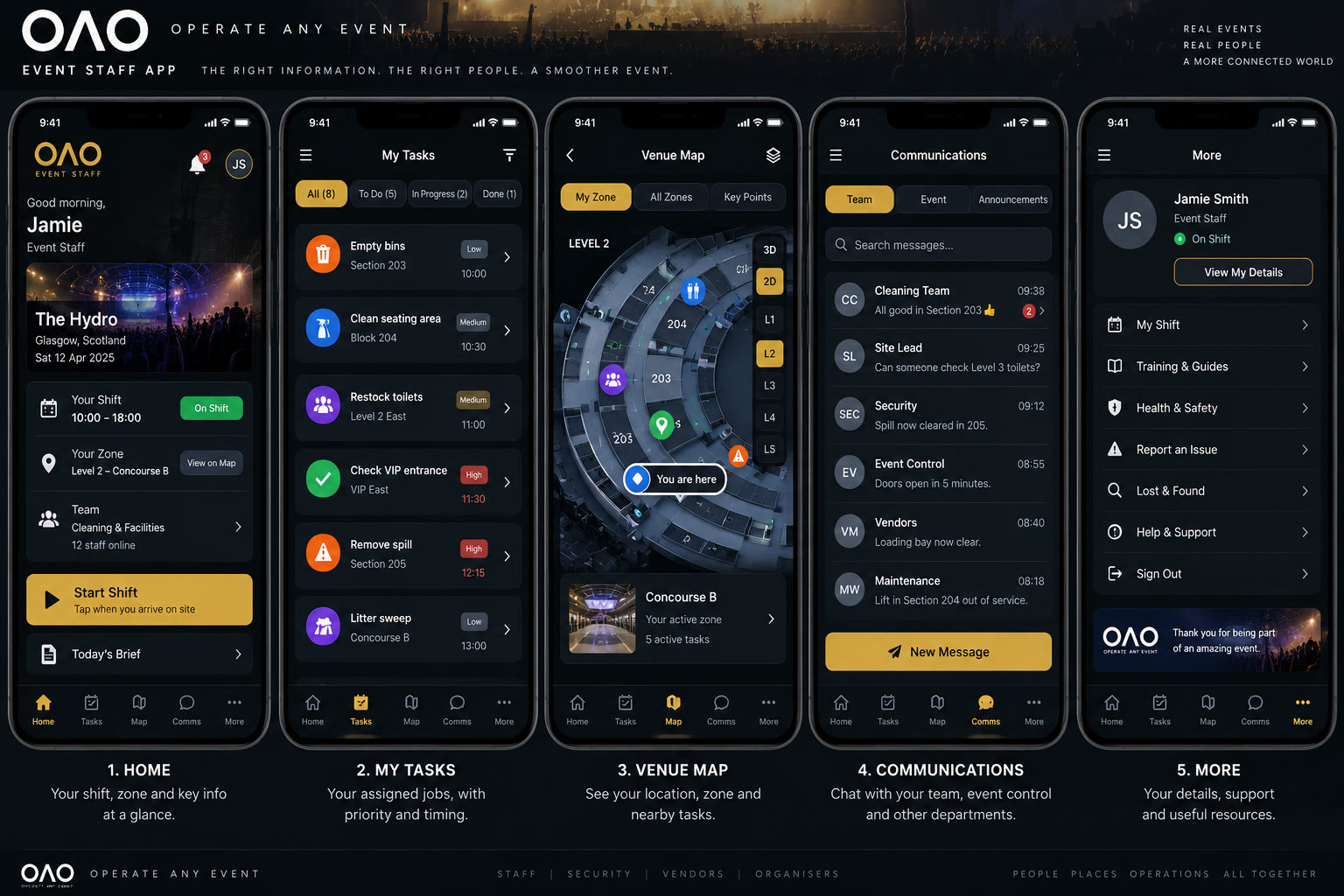
Role workspace
Shift, zone, assigned jobs and team messages. The work in front of them — not the whole operation.
Role workspace
Posts, coverage, incidents and the jobs that belong on the security desk.
Role workspace
Their stall, setup status, and a way to ask for help without ringing the organiser.
Full picture
Everything. People, places, tasks, incidents and communication — the whole event.
Passport
01
A person is invited or signs in with the address the organiser holds.
02
They are attached to this event — not given a generic app login.
03
The organiser assigns the role: staff, security, vendor or organiser.
04
They open the workspace that matches that role. Nothing else.
The organiser assigns role, team, zone, shift and permissions. Staff do not choose their own permissions.
Live event map
Filter the map to the work you need. Open a map item and you open the record — the person, the stall, the incident or the task.
OSO
It looks for exceptions and patterns: a zone going short, a task slipping, a cluster of incidents, a vendor waiting too long. It brings them to the organiser. It does not run the event on its own.
Not another chatbot. An operational second pair of eyes.
Front of house
Hosted Events is what visitors hold: map, timetable, vendors, stamps and the day in their pocket.
Back of house
OAO is what the operation holds: people, places, tasks, incidents and communication. Both sit inside Wheelside. They are not the same product.
Who OAO is for
Crew, traders, security and a site that will not sit still.
Halls, guests, vendors and a day that moves by the minute.
Doors, stages, back of house and the people holding each one.
Repeated events in a known building — still a live operation every time.
People + Places + Tasks + Incidents + Communication
Why OAO exists
That is OAO.
Already built
The demo is a read-only walkthrough of a simulated operation. It is not live event control, and it is not a claim of official partnership.
OAO
People. Places. Operations. All together.